One way to improve workplace productivity is to remove any friction created by distance, limited resources and rigid workflows. When employees have better tools to visualize information, practice skills and collaborate in real time, they can work more efficiently and with greater confidence.
For small and midsized businesses (SMBs), that kind of capability can be a real differentiator. Extended reality (XR), encompassing virtual reality, augmented reality and mixed reality, is giving SMBs practical ways to train teams, streamline operations and collaborate more easily. It’s a flexible, accessible technology that’s helping smaller organizations work smarter and compete on a larger stage. Here’s how.
Next-level multitasking
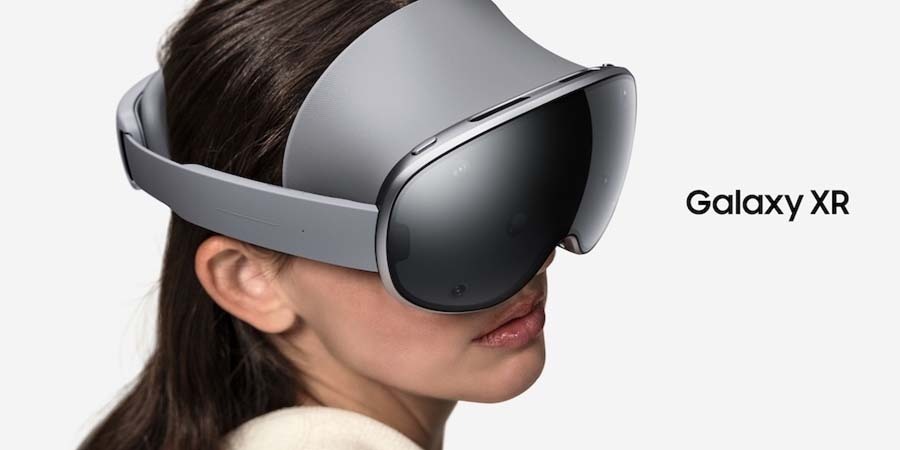
The virtual screen space of XR allows users to level up multitasking, thanks to unlimited screen real estate. On Samsung Galaxy XR, developed in collaboration with Google and Qualcomm, multiple applications can run simultaneously. They’re presented spatially around the user and can be dragged to whatever position suits best. That includes resizing them, expanding or contracting as needed.
Galaxy XR also allows seamless work across all Galaxy devices, including phones and laptops, allowing workers to bring up these home screens in Galaxy XR and answer calls while remaining fully immersed. The pairing saves the trouble of having to recreate their workspace, keeping applications in their usual spaces. Navigation across them is intuitive and controlled through voice commands, eye movements and hand gestures. A keyboard and mouse can be paired, too, if preferred.
Because Galaxy XR runs on the Android XR OS, the device supports all key business apps available on Google Play. Professionals using Galaxy XR can edit documents, browse the web, check email and hold video meetings, and as they do, seamlessly switch between the apps.
Helping to keep it all running smoothly is the Snapdragon XR2+ Gen 2 chip processor, an upgrade from the previous version, with 15% higher GPU and 20% higher CPU. It powers spatial audio, gesture tracking, AI assistance and 4K resolution.
AI-powered workflows
While working via Galaxy XR, tap intelligent assistance anytime via Gemini AI. Gemini on Galaxy XR can understand the digital and physical context so you can speak to it about what
you’re seeing. For example, while watching a YouTube video, you can ask questions through voice commands about the video and get relevant answers from AI.
The same goes for objects in your virtual and real-world surroundings. That includes Google’s Circle to Search feature, allowing SMB staff to circle both real-world and virtual content to get information. In pass-through mode, where users see the physical world around them beyond the virtual dashboard, Gemini AI can become particularly useful. Repair technicians on the job can circle a piece of equipment on the screen, and Circle to Search will instantly provide web-based information about it, including maintenance guides.
It can even help with the workspace itself. When a hard day on the job creates a confusing cluster of apps in all directions, simply ask Gemini to tidy up the workspace and watch the reorganization.
Virtual training benefits
Perhaps one of the most powerful applications of XR headsets is in professional development and training. That applies across multiple industries, too. At the SMB level, Galaxy XR might be used to train new hires in a small retail chain on customer service scenarios or operational procedures. Or a law firm can train employees on new compliance requirements, while a small business may train staff on how to use new software.
This XR training becomes a boon for small organizations who might not otherwise have the resources for such training and development, due to limited budgets and staff. Gemini AI can level up the training further through personalization. As it gets to the know employees using it, Galaxy XR can begin to tailor feedback to their individual needs and performance, even offering tutoring.
Remote collaboration
Now that remote and hybrid work arrangements are the norm, including at SMBs in all industries, virtual meetings with colleagues and clients have become a regular part of business.
Galaxy XR makes those collaboration sessions and check-ins more immersive and engaging by allowing users to create digital avatars that mirror their facial expressions and hand gestures in real time during meetings. They come in two types: a customizable, cartoon-like rendering for a bit of fun, or a more photo-realistic image by Google called “Likeness” created from a scan of your face.
Furthermore, the technology transforms the meeting experience by allowing teams to resize participant windows and shared content to any size. So, instead of squinting at small laptop screens, professionals can view their colleagues and presentations as big as they need.
Galaxy XR also enables immersive remote support in the field, where on-site technicians can share their view with off-site experts who provide real-time troubleshooting assistance. The ability to shift and resize windows and incoming streams, all while remaining hands-free, enhances this support.
Design and visualization work in 3D and at scale
For architects and designers, Galaxy XR offers particular bonuses, especially combined with the dual 4K micro-OLED displays. For example, architects can virtually walk clients through a building under design.
Or, through augmented reality, an interior designer might lay designs atop a physical space, showing various options or projecting the final result, which then allows targeted tweaking according to client feedback. Similarly, retail consultants can help store owners optimize merchandise placement to drive purchases through virtual representations of the store space.
In any industry, Galaxy XR’s ability to auto-spatialize 2D images into 3D enables a more in- depth navigation of blueprints, models, diagrams and flow charts, too, ensuring a great grasp of concepts and direction.
Removing constraints, unleashing business opportunity
The Samsung Galaxy XR headset empowers SMBs to improve productivity and efficiency. By removing the constraints of physical workspaces, it revolutionizes how teams train, collaborate and work. With this freedom of thought and action may come new opportunities of success and growth for SMBs.
Learn more about how innovative technologies are closing the skills gap in real time.