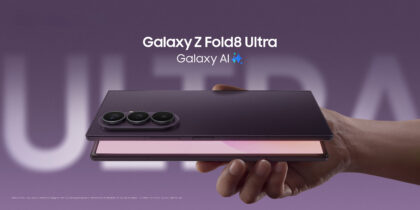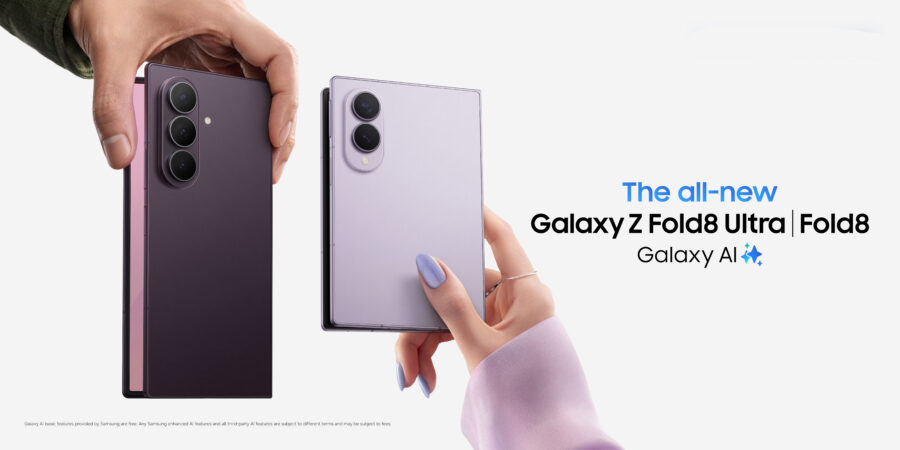
Foldable mobile devices are opening up powerful new ways to get work done on the go. Slimmer and lighter than ever, Samsung Galaxy Z Fold8 and Samsung Galaxy Z Fold8 Ultra let you work like you would on a traditional mobile device when it’s closed and enjoy all the perks of a large, tablet-like screen when it’s open. The design makes multitasking easy and seamless — at work, at home and everywhere in between. In short, with Galaxy Z Fold8 Series mobile devices, business professionals can carry less and do more. Here are 10 reasons why.
1. Double the screen space
Mobile device screens have gotten bigger over the past few years, but they’ve reached a limit. A foldable is the one form factor that gets more screen from a pocket-sized mobile device. Galaxy Z Fold8 and Z Fold8 Ultra start as sleek mobile devices with 5.5-inch and 6.5-inch cover displays, respectively, making it easy to check messages, respond to emails, or handle other quick tasks on the go. When it’s time to dive deeper, simply unfold the device to reveal a 7.6-inch Dynamic AMOLED display on Galaxy Z Fold8 or an 8-inch display on Galaxy Z Fold8 Ultra. The larger workspace is designed for immersive reading, content creation, multitasking and entertainment without sacrificing portability. With display proportions optimized for each mode — including Galaxy Z Fold8’s passport-inspired design with a 10:16 cover display and 4:3 main screen — the devices transition naturally from quick interactions to more focused work and richer viewing experiences.
2. The next step in mobile AI
Galaxy Z Fold8 Series comes equipped with advanced Galaxy AI capabilities designed to enhance productivity. Galaxy AI now understands language, visuals and audio simultaneously, replacing single-mode inputs with a real-time view of your activity. Built-in tools enhance capabilities, including:
- Chat Assist: Streamline messaging with text translation, automatic grammar correction and tone adjustment.
- Browsing Assist: Summarize or translate web articles.
- Live Translate: Two-way audio translation in real time.
- Note Assist: Summarize and organize notes.
- Now Brief: Prepare for your workday with the information and reminders you need at a glance.
- Circle to Search with Google: Capture any image or text and launch a search for supporting sources.
Galaxy Z Fold8 Series also includes Google Gemini, which can support writing, brainstorming, learning and more, all right out of the box.
3. Defense-grade security
Samsung knows how important data security is to your business. That’s why Galaxy Z Fold8 Series comes with Samsung’s defense-grade Knox security, built into the device from the chip up. Knox Suite also offers a comprehensive set of tools — from Knox Manage to Knox Platform for Enterprise — for IT admins to manage, secure and deploy devices across teams.
Galaxy Z Fold8 Series features biometric security options like facial recognition and fingerprint scanning for convenient yet controlled unlocking of the device, as well as Secure Folder to separate personal apps and content. Additionally, a Personal Data Engine and Knox Enhanced Encrypted Protection are both built into the device.
4. Work across multiple windows
Galaxy Z Fold8 Series is made for multitasking on the spacious tablet screen. Its user interface is tailored to be tablet-ready, allowing you to work across multiple apps simultaneously. Google Workspace tools like Gmail, Docs, Sheets, Slides, Meet and Drive adapt beautifully to the larger screen, so you can review documents, join video calls and collaborate in real time.
Using Multi-Window on Galaxy Z Fold8 Series, you don’t have to toggle between apps. You can participate in videoconferences while checking messages and confirming availability on your calendar. Or you may review a spreadsheet while you run numbers with the calculator and simultaneously play music from your favorite streaming service. It’s easier than ever to work on documents and emails from anywhere, without powering up a laptop.
5. Launch apps fast
Working productively means accessing apps fast. On the right side of the screen in tablet mode, the Edge Panel serves as home base for your most-used apps and is easily customizable to fit individual workflows. When you frequently use the same apps together in Multi-Window, you can save the pairing to the Edge Panel and launch your customized multitasking suite with just one tap. All the apps in your pairing will open instantly, either refreshed or at the point where you left off, depending on your settings.
6. Drag and drop
Mobile productivity depends on efficiency. Drag-and-drop functionality gives Galaxy Z Fold8 Series that extra bit of efficiency that makes all the difference when immersed in work. Move images and text to and from emails, documents and presentations with a single motion. For instance, you can drag an image from an email into a PowerPoint presentation while preparing for an important meeting or drag a paragraph from Word into a text message without needing to copy and paste.
7. The ultimate camera on a Fold
In the age of social media and digital marketing, having a phone with a pro-level camera is a game changer. Galaxy Z Fold8 Ultra stands at the head of the Fold line, delivering stunning images with a 200MP main camera 50MP ultrawide, 10MP telephoto 3x Optical Zoom and 30x Digital Zoom, on top of the two 10MP lenses on the cover and main screens. Add in the ProVisual Engine suite of AI-powered editing tools, and you can elevate your business photography to stand out among professionals.
8. Hands-free videoconferencing
When you flex Galaxy Z Fold8 Series, it stands upright on its own. Flex Mode makes it easy to join a videoconference and chat hands-free. That’s a major plus for business owners on the go. Whether at the airport, in a hotel lobby or at a coffee shop, you have a device that stays standing for face-to-face meetings. Meanwhile, you may use the bottom portion of the screen to take notes or view up to two other apps at the same time, without interrupting your call.
The powerful camera specs help here, too. Galaxy Z Fold8 Series includes a front-facing camera on the cover screen and an under-display camera on the main screen, giving you flexible options. ProVisual Engine helps optimize lighting and detail, all on its own. Whether you’re propping it up or holding it in your hand, the device adapts to the conditions of the moment.
9. Go from tablet to PC
Galaxy Z Fold8 Series has the computing power of a PC — and can virtually transform into one using Samsung DeX, which extends your mobile device into a desktop experience. Connect wirelessly to any Miracast-enabled display, including Samsung Smart Monitors, or plug in via an HDMI-to-USB-C cable.
Thanks to One UI 9 and Android 17, the DeX experience feels even more intuitive, integrating enhanced multitasking and AI assistance. Use Galaxy Z Fold8 Series as a trackpad or keyboard, or pair a Bluetooth keyboard and mouse to free up the device for calls, texts and multitasking.
10. Now Nudge
With the Now Nudge feature, Galaxy Z Fold8 Series becomes an even sharper personal assistant. Recognizing content and context, Now Nudge connects the dots across multiple apps, saving you time by letting you switch back and forth while hunting for info and data. For example, when a colleague requests a meeting, Now Nudge automatically searches the calendar and surfaces available dates and times. Or if you receive a request for a document, spreadsheet or report, Now Nudge scans your files and pulls them up.
From phone to tablet, and from AI to PC, Galaxy Z Fold8 Series is your all-in-one portable workstation.
Discover more features of Galaxy Z Fold8 and how they can upgrade your business. Visit Samsung Business to find the right solutions and exclusive benefits for businesses of all sizes.