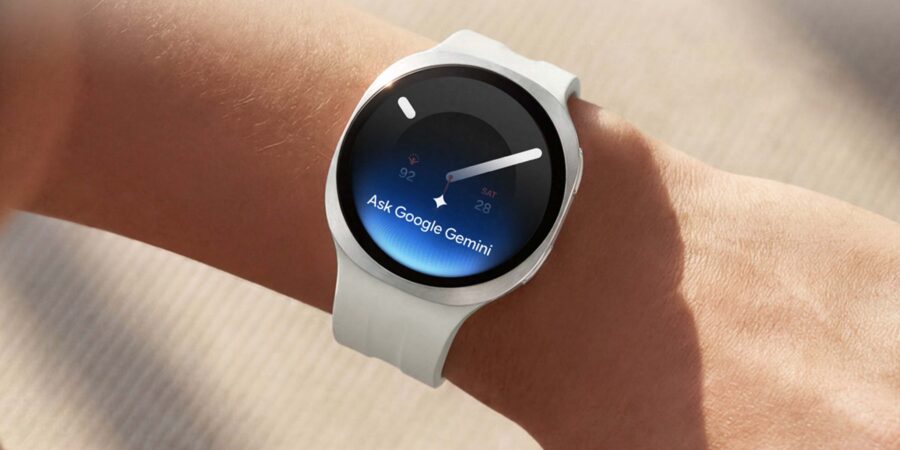
Wearables aren’t just for workouts — they’re also for the workplace. Samsung Galaxy Watch9 and Galaxy Watch Ultra2 combine sleek, professional design with meaningful AI and advanced health and wellness features to support productivity throughout the entire day. They can give organizations another way to strengthen employee wellness programs.
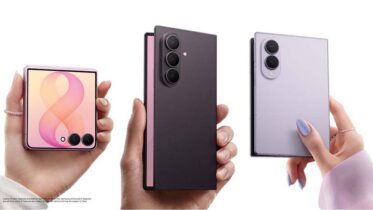
As part of the Galaxy ecosystem, these smart watches work seamlessly with other Samsung devices. Pair with a Galaxy mobile device; such as Galaxy Z Fold8 Ultra, Galaxy Z Fold8 and Galaxy Z Flip8; and use them alongside Galaxy Book to move from quick updates on your wrist to more detailed work on a larger screen.
Here are five ways to set up your Galaxy Watch9 and Galaxy Watch Ultra2 for a smoother workday, from the first meeting to your workout and wind down.
1. Get started
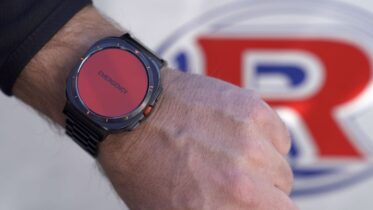
Samsung Galaxy Watch9 combines its streamlined cushion design with a softer sport band for comfortable, all-day wear. An air-pocket structure helps distribute pressure and improve airflow, giving the watch a secure fit and a refined look that works as well in the office as it does after hours.
For more demanding environments, Galaxy Watch Ultra2 adds a premium titanium design with rugged durability suited to both field work and everyday wear.
When you power on Galaxy Watch9 for the first time, it should automatically connect to a nearby Galaxy mobile device with Bluetooth enabled. If pairing doesn’t happen automatically, open the Galaxy Wearable app on your mobile device to pair them manually. Samsung account syncing helps keep supported apps and settings consistent across devices.
Once Galaxy Watch9 is set up and synced, take a few minutes to personalize the watch face around the information you use most during the workday.
2. Set notifications
As a smart companion to your Galaxy mobile device, Galaxy Watch9 helps you stay connected without constantly reaching for another screen. You can view notifications directly on your wrist, with the control to choose alerts that support your day rather than interrupt it. At work, that typically means prioritizing email, chat and calendar notifications, though you may adjust the settings around your own workflow.
Need a moment of peace? You don’t have to turn off notifications individually or permanently. Swipe down from the top of the watch face to open the quick panel, where you can activate Do Not Disturb with a single tap. You are also able to sync Do Not Disturb between your watch and mobile device for full-focus moments. For more discretion — such as during meetings — enable Theater Mode, which silences notifications, darkens the display and turns off gesture commands.
3. Talk and text
Answer calls, send texts and stay connected, all from your wrist. With an LTE model and active service, you can leave your Galaxy mobile device behind and still handle communications on the go. Built-in microphones and speakers let you make and answer calls directly from Galaxy Watch9 or Galaxy Watch Ultra2.
When it comes to text messages, the watches give you several ways to respond:
- Send a voice recording or use voice input.
- Write by hand and convert it to text.
- Tap an emoji or quick reply.
- Use the on-screen keyboard.
For a more discreet call experience, pair Galaxy Watch9 or Galaxy Watch Ultra2 with Galaxy Buds4. You can manage the call from your wrist while listening and speaking through the buds.
That flexibility keeps communication moving whether you’re at the office, between meetings or in the field.
4. Work your way through the day
When the workday moves quickly, small efficiencies matter. Galaxy Watch9 puts useful tools within easy reach, with customizable settings and app shortcuts that reduce the need to stop and pick up another device. Program the side button to launch Voice Recorder for instant notetaking or simply raise your wrist to talk to Gemini for hands-free AI assistance while you’re moving between tasks or working with your hands full.
Long travel days and back-to-back meetings also make battery life important. Galaxy Watch9 combines increased battery capacity with improved power efficiency to support longer use throughout the day.
When you need to stretch it further, turn on Power Saving mode from the settings menu or tap the battery icon in the quick panel. Even in this mode, you’ll still receive necessary notifications from your phone and essential apps via Bluetooth.
5. Support wellness
When the workday ends and it’s time to recharge — whether through rest or a workout — Galaxy Watch9 and Galaxy Watch Ultra2 help you stay connected to your wellness routine. With AI-powered health monitoring and personalized guidance, the watches go beyond step counts:
- Vitals monitors your body while you sleep for early warning signs of possible health issues and ways to improve.
- Sleep Tracking provides a sleep score and personalized guidance. Sleep Apnea 2.0 also provides insight into breathing disruptions.
- Heart Health Score focuses on cardiovascular trends. You can track blood pressure right from your wrist.
- Fitness Index analyzes fitness across areas such as strength, flexibility, endurance and cardio, then suggests goal-based training.
- Daily Cardio Load considers activity and exercise accumulated throughout the day to recommend recovery time.
Together, these features give you a broader view of sleep, recovery, cardiovascular health and fitness. Personalized insights can make that information easier to understand and act on, supporting healthier habits over time.
For organizations, pairing Galaxy Watch9 or Galaxy Watch Ultra2 with Samsung Knox Manage enables a secure, scalable solution for today’s modern workforce. IT teams may configure and manage devices remotely, while employees gain hands-free access to communication, AI assistance and wellness insights throughout the day.
From productivity gains to enhanced wellness programs, Galaxy Watch empowers employees to do their best work — and feel their best doing it.
Unfold next-level productivity for your business with wearables in the workplace today. And speak with a Samsung Business expert today to learn more about the Galaxy ecosystem.